
Fake SingPost website turns out to be phishing scam, requires users to make payment

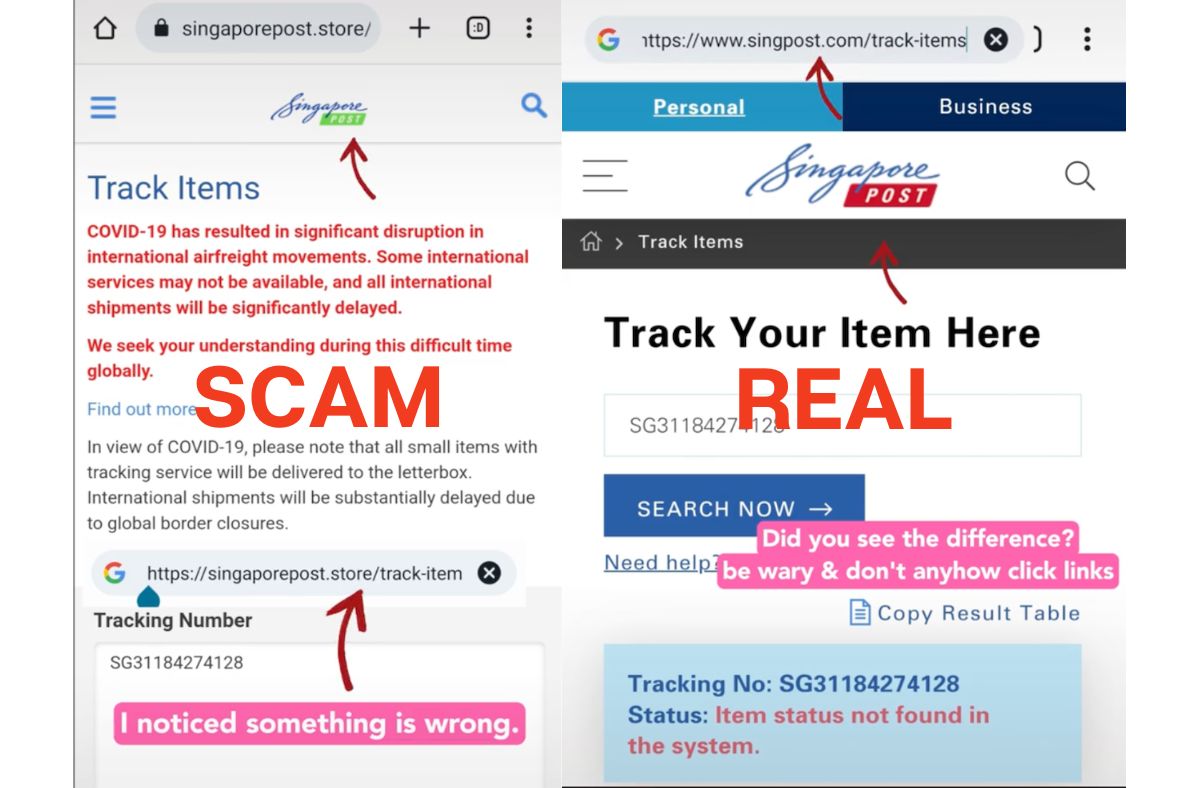
Photo: TikTok screengrab
A member of the public almost fell for a phishing scam after receiving a seemingly legitimate delivery notification text message which was redirected to a professional-looking Singapore Post (SingPost) website that even showed a fake SingPost tracking number.
“I received this SMS without thinking much. I clicked on the link,” wrote a TikTok user who was notified by “SingPost” about a failed delivery attempt.
[caption id="attachment_444248" align="aligncenter" width="680"] Photo: TikTok screengrab[/caption]
The sender was tagged as “-SingPost-“ and the attached URL was for “singaporepost.store.”
The receiver clicked the link and was brought to a “SingPost” website that looked correct. It showed apparently a SingPost tracking number and even had a Covid-19 disclaimer regarding “significant disruption in international airfreight movements.”
[caption id="attachment_444250" align="aligncenter" width="686"] Photo: TikTok screengrab[/caption]
However, this was when the TikTok user noticed something was wrong. The website URL didn’t match the official SingPost website, which is always “singpost.com.”
Here is a comparison of the phishing website versus the SingPost website.
[caption id="attachment_444251" align="aligncenter" width="684"] Photo: TikTok screengrab[/caption]
[caption id="attachment_444253" align="aligncenter" width="690"] Photo: TikTok screengrab[/caption]
The receiver also tried using the mentioned SingPost tracking number through the official website but failed.
[caption id="attachment_444252" align="aligncenter" width="676"] Photo: TikTok screengrab[/caption]
SingPost has since issued a warning for members of the public to be alert against such scams.
“Scammers are using SMS and email phishing disguised as delivery notifications, targeting SingPost customers by tricking them into accessing fake websites to make payments or to provide sensitive personal information.”
SingPost attached a couple of examples of scam attempts in the form of SMS and email messages.
[caption id="attachment_444254" align="aligncenter" width="2530"] Photo: From SingPost website[/caption]
[caption id="attachment_444255" align="aligncenter" width="2318"] Photo: From SingPost website[/caption]
Those who received such messages are warned not to click on any links or respond to calls and emails.
SingPost reminded the public that payments can only be done through the SingPost Mobile App, at SAM machines or any post office and never through an online link.
Furthermore, parcels can only be tracked on the SingPost Mobile App and singpost.com/track-items.
SingPost will never request personal or banking information from the customer, nor would it send SMSes for non-delivery matters such as lucky draws, loans or job offers.
Newsletter
Get updates straight to your inbox
“If we are unable to deliver an item to you, you will receive a physical Non-Delivery Advice to collect the item from a post office or POPStation.”
Those who receive a suspicious email, letter, SMS or phone call purportedly from SingPost can call the hotline at 1605 to verify the authenticity of such messages.
Those who suspect they have responded to a phishing scam are advised to lodge a police report, change PINs or passwords on online accounts and contact their banks to stop any transactions./TISG
https://theindependent.sg/beware-of-ongoing-phishing-scam-in-carousell-victims-told-to-click-links-from-scammers-posing-as-buyers/